

Blueprint is not a toy, and C++ is not a rite of passage. Here is the honest engineering case for shipping a whole game without writing a line of C++, and where that case has limits.
BRIEFING
The myth is that real games require C++. They do not. The Blueprint virtual machine is slower than native code, but for the vast majority of gameplay that gap is noise, and what actually makes a project scale, or collapse, is architecture, not language. This piece separates the real performance facts from the folklore, shows the practices that keep a 100% Blueprint game fast, and stays honest about the few places C++ still earns its keep.
Every Unreal developer meets this sentence eventually: "Blueprint is fine for prototyping, but you will have to rewrite it in C++ for the real game." It gets repeated so often it starts to sound like a law of physics. It is not. It is a half-truth, and it has quietly scared a lot of capable teams away from simply shipping.
Here is the honest version. Blueprint runs on a virtual machine, so yes, node for node, it is slower than compiled C++. And yes, there are corners of a project where that difference is real. But "slower than C++" is not the same as "too slow to ship," and the thing that actually decides whether an Unreal project scales is not the language you typed it in. It is how you built it.
Games ship in Blueprint. Not tech demos: finished, sold, award-winning games. Clair Obscur: Expedition 33, the acclaimed 2025 RPG from Sandfall Interactive, was built roughly 95% in Blueprints, with all of its gameplay systems scripted visually by a team of only four programmers, as the studio detailed at GDC. At the other end of the scale, Born of Bread, a Paper Mario style RPG from WildArts Studio, was made entirely in Blueprints, and the team's programmer did not even know C++ when the project started. A breakout hit and a tiny indie, both mostly or entirely Blueprint. So the useful question was never "Blueprint or C++." It is "where does Blueprint's cost actually land, and how do I design around it." That is what this article is about.
What is actually true, so we can drop the folklore
Blueprint is compiled into bytecode and run by a virtual machine. C++ is compiled straight to machine code and runs natively. So every Blueprint node pays a small interpretation tax that C++ does not. That part of the myth is true.
How big is the tax? In published benchmarks, an empty Event Tick node costs on the order of 0.2 microseconds per actor, per frame. Moving 500 actors purely in Blueprint can cost around 1 millisecond of frame time, while Epic's heavily optimized C++ player controller in the Lyra sample handles a lot of input and camera work in roughly 80 microseconds. The overhead is real, it is measurable, and it only starts to hurt when you multiply it: thousands of actors, heavy math every frame, giant loops, tight networking.
For the gameplay most games are actually made of, that overhead is noise next to the C++ engine doing the real work underneath: rendering, physics, animation, audio. Which points at the reframe that changes everything.
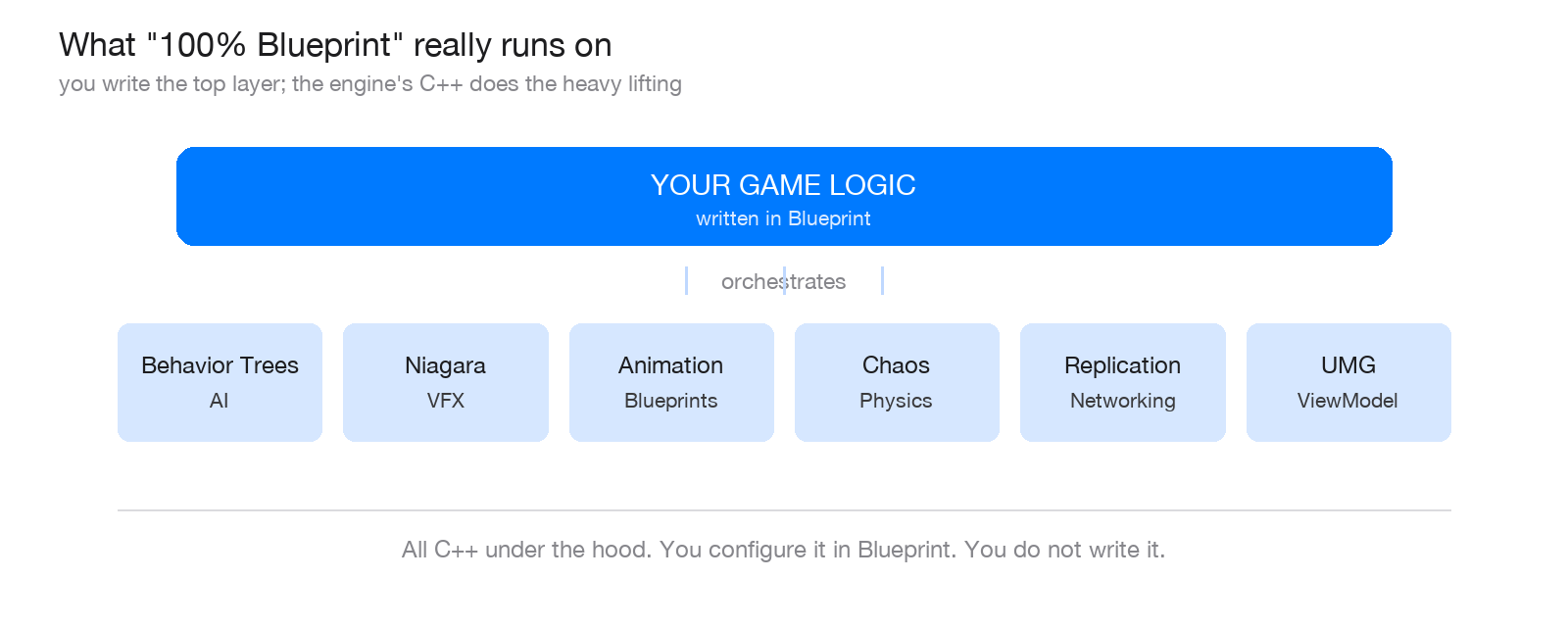
"100% Blueprint" rarely means no C++ runs. It means you orchestrate the engine's C++ systems visually instead of writing them.
The myth's real target: architecture, not language
When people say "Blueprint does not scale," what they almost always mean is "this particular Blueprint project turned into an unmaintainable mess." That is not a language problem. You can write spaghetti in any language, and plenty of people write it in C++.
The things that let a large Unreal project scale are identical in Blueprint or C++: decoupling, clear ownership of data, reusable components, and driving logic from data instead of hard-coding it. These are the same lessons Robert Martin teaches in Clean Code and Robert Nystrom lays out in Game Programming Patterns, and they are entirely language-agnostic. A disciplined Blueprint project scales. An undisciplined C++ project drowns just the same. It just drowns with longer compile times.
The practices that keep 100% Blueprint fast
1. Get off Event Tick
Event Tick runs every single frame, and its cost multiplies with every actor that uses it. Most logic does not need per-frame updates. Replace it with Timers for anything periodic (re-check a target every 0.5 seconds), with overlap and physics events like On Component Begin Overlap that fire once instead of every frame, and with your own custom events that fire only when something actually changes. When you genuinely need per-frame work, like movement or camera, raise the Tick Interval or tick only the handful of actors that truly must.
2. Communicate by events, not by casting to everything
Event Dispatchers and Blueprint Interfaces let systems talk without hard references to each other. That decouples your code and, as a bonus, cuts the reference chains that bloat memory and load times. Keep casting for when you truly need the concrete class, not as your default way to reach another actor.
3. Compose with Actor Components
Push reusable logic into Actor Components instead of stacking deep inheritance. Components are smaller, testable, and reusable across unrelated actors, and they stop any single Blueprint graph from growing into a monster nobody wants to open.
4. Drive it with data, not hard-coded values
Structs, Enums, Data Tables and Curve Tables move your balancing and content out of the graph. Designers tune numbers without touching logic, your Blueprints stay small, and you stop recompiling the whole thing to change a damage value.
5. Do not crunch heavy math in a per-frame loop
If you must process large arrays or run thousands of checks, spread the work across frames, cache results you can reuse, or hand that single hot spot to a system built for it. The mistake is not "using Blueprint," it is running an expensive loop every frame when you did not have to.
6. Lean on the C++ systems Unreal already hands you
This is the quiet secret behind every shipped Blueprint game. Behavior Trees, Niagara, Animation Blueprints, the Chaos physics system, network replication, and the UMG ViewModel are all C++ under the hood. You configure them in Blueprint and get native performance for free. "100% Blueprint" almost never means no C++ runs. It means you are not the one writing it. It is exactly how Sandfall built Expedition 33: a vanilla-first approach, using Unreal almost as Epic ships it and pushing the built-in systems to their limits instead of writing their own.
7. Profile before you rewrite a single node
Use Unreal Insights and the stat commands to find the real hot path. Optimize what is measurably slow, not what you assume is slow. Nine times out of ten, the fix is a design change, not a language change.
Where C++ still earns its keep
Being honest about the limits is what makes the rest credible. A few situations genuinely favour C++:
- Truly hot code: thousands of agents running complex logic every frame, heavy custom math, or large tight loops that no amount of design will thin out.
- Low-level and engine work: custom engine modules, integrating a third-party C++ library, or reaching into networking internals.
One important note for anyone who remembers the old trick: Blueprint Nativization, the feature that auto-converted Blueprints into C++, was deprecated in Unreal 4.27 and removed in UE 5.0, because the generated code was not as fast as hand-written C++ and was painful to debug. So the modern move is not to nativize. It is to profile, find the one Blueprint that is actually a bottleneck, and, if it truly needs it, rewrite that single system in C++, often as a C++ base class with a Blueprint subclass on top. You keep the speed and the fast iteration of Blueprint everywhere else, and you pay for C++ only where it buys you something real. C++ is a scalpel, not an entry fee.
Blueprint's real superpower: iteration speed
The best reason to default to Blueprint is not that it is easier. It is that iteration speed is a shipping advantage. There is no long compile-and-link cycle for a gameplay tweak, your designers and artists can read and adjust the logic themselves, and you can change things live while the game is running. On a small team, the hours you save iterating usually matter far more than the microseconds you spend on the virtual machine. Shipping is a race against time and budget, and Blueprint is fastest exactly where it counts: in the loop between having an idea and seeing it in the game.
KEY TAKEAWAY
C++ is not the price of admission to a real game. It is a scalpel you reach for at a specific hot spot, after profiling, not a foundation you are required to pour first.
WATCH OUT
Do not read this as "never touch C++." Read it as "do not rewrite in C++ out of superstition." The failure mode runs both ways: teams who cargo-cult a full C++ rewrite they never needed, and teams who let a Blueprint project rot because nobody enforced any architecture. Discipline is the requirement. The language is a choice.
Two questions before you "rewrite it in C++"
Before you accept that you need to rewrite something in C++, ask two things. First: is it actually slow, measured in Unreal Insights, or does it just feel like it should be? Second: is the problem the language, or a design that would be just as messy in C++? Answer those honestly, and more often than not you will find your 100% Blueprint game was ready to ship all along.
Glossary
Blueprint. Unreal's visual scripting system. You build logic as node graphs that compile to bytecode run by a virtual machine.
C++ (in Unreal). the engine's native language. It compiles to machine code and runs without a virtual machine, so it is faster for raw computation.
Blueprint virtual machine (VM). the runtime that interprets Blueprint bytecode. That interpretation step is the source of Blueprint's overhead versus C++.
Event Tick. a node that runs every frame. Convenient but costly at scale, and the first thing to minimize.
Timer. schedules a function to run at an interval, say every 0.5 seconds, instead of every frame. A core alternative to Tick.
Event Dispatcher. a Blueprint broadcast that lets systems react to something without holding a hard reference to whoever fired it. Key for decoupling.
Blueprint Interface (BPI). a shared contract that lets Blueprints talk to each other without casting to a concrete class.
Actor Component. a reusable module of logic you attach to actors, favouring composition over deep inheritance.
Blueprint Nativization. a removed feature (deprecated in 4.27, removed in UE 5.0) that auto-converted Blueprints to C++. Not a modern optimization path.
Profiling (Unreal Insights). measuring where frame time actually goes, so you optimize the real hot spot instead of guessing.
Building a game in Blueprint and worried it will not hold up?
I build clean, scalable game systems in Unreal Engine, 100% Blueprint, architected to stay fast and stay maintainable all the way to ship.
If your project needs an outside pair of eyes on its architecture, or a system built right the first time, that is what I do.